
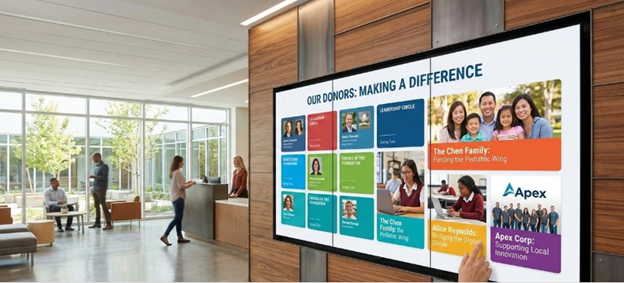
Physical donor walls eventually run out of space. When a capital campaign exceeds expectations, organizations often find themselves struggling to add new names to a brass, glass, or acrylic installation that was designed for a fixed number of plaques. Digital displays solve the physical capacity problem while giving nonprofits a practical way to tell the actual stories behind the gifts. Instead of just listing a name, a digital interface lets you show a video about why that family chose to fund the new pediatric wing or the university science lab.
Transitioning to a digital system requires looking closely at hardware lifespan, content management workflows, and ongoing technical support. You have to consider who will actually manage the updates once the installation is complete. The market offers a wide range of products. Some are custom-built touchscreen installations tailored specifically for universities and hospitals. Others are basic digital signage software packages adapted for nonprofit use. Finding the right fit depends entirely on your internal resources, your budget, and your overall facility branding strategy. I’ve outlined seven options that fit different operational needs and budgets for nonprofits operating right now.
1. Touchstone Digital Solutions
Touchstone Digital Solutions provides custom-built digital recognition displays designed specifically for nonprofits, universities, and schools. Unlike general software vendors that sell you a platform license and expect you to design the interface yourself, they handle the visual identity and content structure from the ground up.
Their entire business model is built strictly around institutional recognition. The content management system is accessible for non-technical staff, meaning your advancement or development team can update donor tiers without constantly submitting internal IT tickets. This matters because keeping a donor database updated should not require a graphic designer or a software engineer.
Features and operational details:
- Fully managed custom build tailored to your specific campaign branding.
- Dedicated content management system designed for donor tiers and honoree profiles.
- Handles multiple recognition types including hall of fame and team wall setups on a single display.
- Includes dedicated ongoing support rather than a self-service help desk.
2. Norvision
Norvision focuses on bespoke donor recognition displays built specifically for organizations running dedicated giving programs. Their platform scales effectively for both large multi-million dollar campaigns and smaller community fundraising efforts, offering interactive walls that connect supporters with the organization.
Because they focus narrowly on philanthropic giving, their system handles donor structures well. The trade-off is organizational scale. If your facility needs to recognize athletic achievements, alumni awards, and capital donors in the exact same system, you might need a secondary vendor to handle those other recognition types. It’s best suited for facilities where the sole focus is tracking and displaying monetary contributions.
Features and operational details:
- Managed donor recognition platform scaling to different campaign sizes.
- Built explicitly for giving programs and active donor engagement.
- Focused functionality that limits overlap with other institutional recognition needs.
- Handles complex donor hierarchies and naming rights structures.
3. Digital-Trophy-Case.com
When an organization wants a straightforward directory rather than a deeply customized narrative experience, this kiosk vendor provides a practical hardware and software package. Digital-Trophy-Case.com sells interactive touchscreens generally ranging from 43 to 65 inches.
The system relies on cloud-managed, searchable honoree profiles. It works well for visitors looking to find a specific name quickly in a busy lobby. Institutions wanting rich video biographies, highly customized interactive timelines, or complex branding might find the fixed format restrictive. It remains a reliable choice for standard directory use where utility is the main priority.
Features and operational details:
- Bundled touchscreen kiosk hardware in standard commercial sizes.
- Cloud-managed searchable profiles for quick navigation.
- Predictable fixed hardware packages rather than custom fabrication.
- Simple directory interface that prioritizes fast name lookup.
4. RA Solutions (Recognition Art)
Some development directors hesitate to go entirely digital because they want the tactile, permanent feel of a traditional installation. RA Solutions blends traditional physical fabrication using wood, metal, and etched glass materials with an embedded digital touchscreen component.
This hybrid approach gives you the sculptural look of a classic installation alongside a screen for dynamic content updates. You should expect higher upfront fabrication costs and longer lead times compared to a purely digital deployment. Keep in mind that updating the physical materials surrounding the screen will still require traditional engraving and shipping processes down the line.
Features and operational details:
- Hybrid physical and digital installation.
- Blends metal and wood fabrication with embedded screens.
- Maintains a tactile aesthetic for conservative donor bases.
- Requires a mix of physical and digital update procedures.
5. Rise Vision
Rise Vision is primarily a cloud signage platform offering instant screen updates from any device. Founded originally as a general digital signage company, they provide standard templates that include basic donor walls among hundreds of other generic screen designs.
Because this is a horizontal signage product built for everything from high school hallway announcements to corporate emergency alerts, the donor wall templates are basic. It serves as a reasonable low-cost entry point for nonprofits with tight budgets. You will need to put in manual design work to make the out-of-the-box templates fit your brand standards.
Features and operational details:
- Cloud signage platform with multi-device update capability.
- Pre-built templates for basic donor recognition.
- Very low barrier to entry for budget-conscious organizations.
- Requires internal design work to move beyond the generic look.
6. eCardWidget
Not every nonprofit needs a large physical touchscreen in their lobby to recognize donors. eCardWidget takes a completely different approach by focusing on digital acknowledgment and direct donor stewardship campaigns.
It is a lightweight web platform that allows organizations to send personalized digital cards. It functions well for ongoing donor stewardship rather than serving as a capital campaign monument. If you want a physical centerpiece in your building, you will need a separate hardware vendor. This works best as a supplementary tool for immediate gift acknowledgment.
Features and operational details:
- Lightweight web platform for digital outreach.
- Library of templates for donor and employee acknowledgment.
- Operates independently of any physical display hardware.
- Focuses on immediate stewardship rather than permanent public display.
7. PandaSuite
PandaSuite is a no-code platform that lets non-technical teams build interactive apps and kiosk experiences. It gives your internal creative team complete control over how the final product looks and functions.
This is essentially a blank canvas. You will need to design the honoree structure, donor tiers, and interface logic yourself. If your organization has the internal resources to design, build, and manage an interactive application, this offers total flexibility. If you lack dedicated design staff, the initial setup and ongoing upkeep can easily become a burden. You don’t want to get stuck paying an outside agency every time you need to update a donor profile.
Features and operational details:
- Self-managed no-code platform with drag-and-drop flexibility.
- Capable of building general interactive displays for any industry.
- Requires significant internal design resources to configure.
- Offers complete creative control for organizations with the right staff.
Managing the Deployment Process
Selecting the right digital donor wall is just the first step in replacing a static donor wall. Hardware placement matters just as much as the content on the screen. The screens need to be positioned where glare from lobby windows will not wash out the display during peak visiting hours. You also need to verify that stable power and hardwired data lines run directly to the installation site before ordering any hardware. Relying on wireless internet connections in public lobbies is rarely reliable enough for permanent digital installations. A dropped connection leaves a blank screen in your most important public space.
Updating donor information should become a standard part of your gift processing workflow. The main reason organizations move away from brass plaques is to simplify the process of recognizing new gifts. If the digital system requires a hired developer or a graphic designer to add a single name, you have defeated the purpose of the upgrade. You want your development team to be able to log in, add a new major donor, assign them to the correct giving tier, and hit publish. Choose a system that matches the technical capability of the administrative staff who will actually manage the database. A successful deployment looks great on day one, but its true value is measured by how easy it is to maintain three years later.
